I have been pinged by a few people to ask how to set up Veeam Endpoint Backup e-mail notification with a Hotmail / Live mail or outlook.com consumer address. The same goes for gmail or any other consumer e-mail service. So let’s share this with the world.
I’ll provide an example that you can use for your own needs and environment. Only the details will differ based on your provider.
Fill out your e-mail address and the password for your e-mail account.
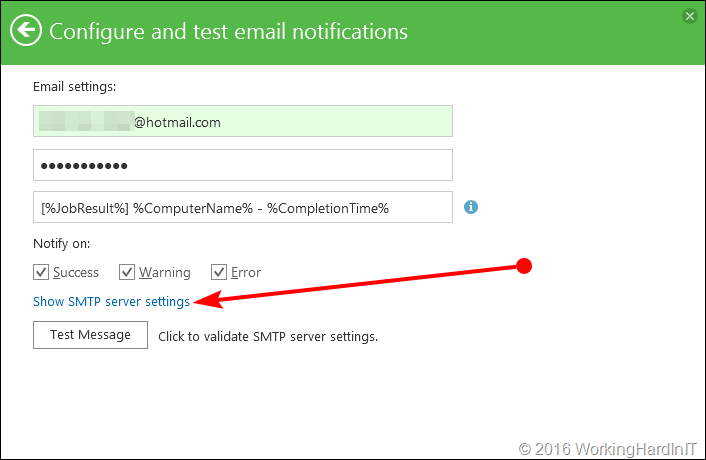
Click on”Show SMTP server settings” (see the red arrow) and than fill out the smtp server address. For outlook.com this is smtp-mail.outlook.com. The port to use is 587 (TLS). Leave the checkmark for secure connection enabled. By using port 587 you’re indicating you’ll use TLS not SSL, which is being going away, don’t use that anymore, over port 465. Unless you must with your provider. If you can’t use a secure connection you’ll probably need port 25 nut most consumer free e-mail service providers don’t even offer /allow this.
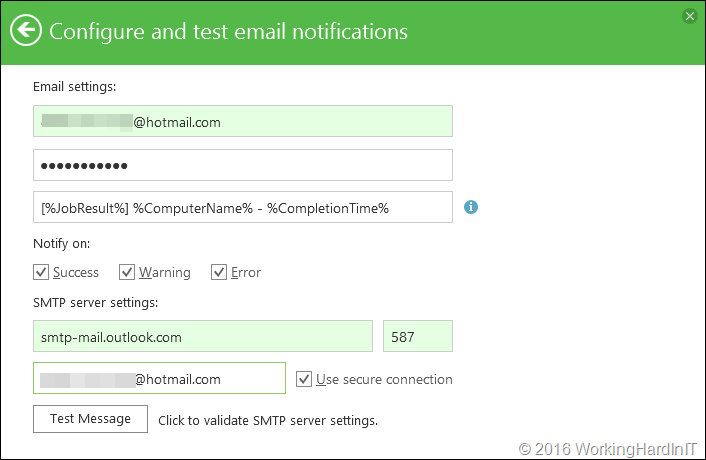
Click on the test message button, what about 5 to 10 seconds, hit F9 in your e-mail client and you should see the test e-mail arrive.

Another smtp servers that will work for Hotmail / Live mail / Outlook.com is smtp.live.com also with port 587. For gmail you can use smtp.gmail.com over port 587. For Yahoo it’s smtp.mail.yahoo.com again, port 587.
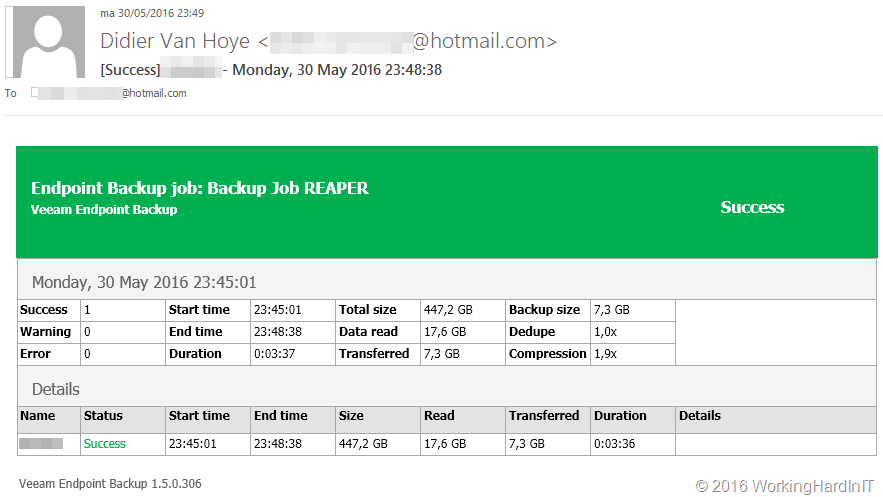
Every morning I find a e-mail that tells me about the success of issues with my Veeam Endpoint Backup. Easy.
The only thing you need to remember is that such consumer accounts are throttled in the number of e-mails you can send per day. So don’t go spamming yourself now. Hope this helps some of you out there!